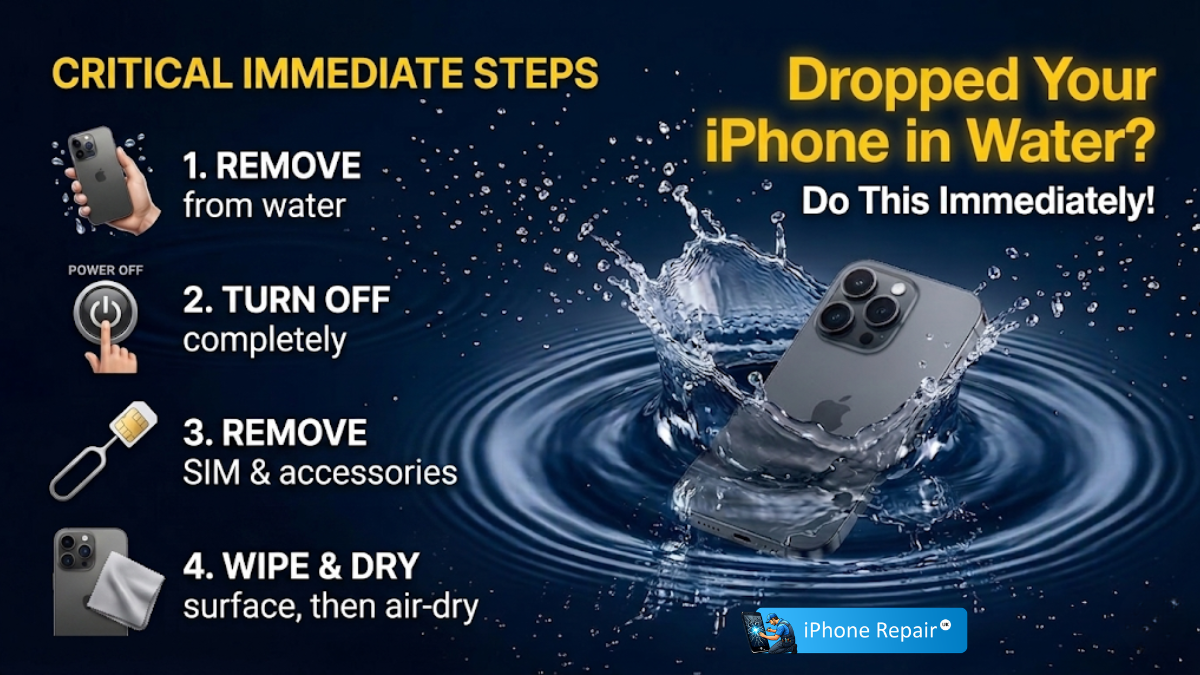
If your iPhone has fallen into water, act immediately: retrieve it, power it off, remove the case and SIM tray, and gently pat it dry with a lint-free cloth. Do not use rice, a hair dryer, or attempt to charge it. Place the phone near a cool fan or in a sealed bag with silica gel packets and wait at least 48 hours before powering on. If problems persist, seek professional iPhone water damage repair without delay.
That sickening moment when your phone slips out of your hand and into water is something most of us have experienced—or will at some point. Whether it’s a kitchen sink, a swimming pool, a toilet, or a puddle on a rainy Newport afternoon, water and electronics are a dangerous combination. The good news is that quick, informed action can dramatically improve your chances of saving the device.
This guide covers exactly what to do (and what to avoid) in the critical first minutes and hours after water exposure, and explains when it’s time to hand things over to a professional. If your phone is already showing symptoms—distorted display, no power, erratic behaviour—skip ahead and contact us for emergency repair straight away.
Understanding iPhone Water Resistance
Modern iPhones (iPhone 7 onwards) carry an IP67 or IP68 water resistance rating. That means they’re designed to withstand submersion to a certain depth for a limited time—typically one to six metres for up to 30 minutes depending on the model. However, water resistance is not the same as waterproof. The seals degrade over time through general wear, drops, and temperature fluctuations. A two-year-old iPhone that survived a splash when new may not survive the same exposure today.
Additionally, Apple’s warranty and AppleCare+ do not cover liquid damage. Every iPhone contains a Liquid Contact Indicator (LCI)—a small strip inside the SIM tray slot that turns red upon contact with water. Once triggered, it’s a permanent record.
Phase 1: Immediate Action — The First 60 Seconds
Speed is everything. Every additional second the phone spends submerged increases the risk of short circuits and corrosion. Follow these steps as quickly as possible:
- Retrieve the phone immediately. The longer it sits in liquid, the deeper water penetrates through speaker grilles, the charging port, and any micro-gaps in the chassis.
- Power it off. If the screen is still lit, hold the side button and either volume button (on Face ID models) or just the side button (on Touch ID models) and slide to power off. If it’s already off, do not attempt to turn it on. Electrical current running through wet components causes short circuits and permanent damage to the logic board.
- Remove the case, screen protector, and any accessories. Cases trap water against the body of the phone, and screen protectors can hold moisture against the display seal.
- Eject the SIM tray. Use the SIM ejector tool or a straightened paperclip. Removing the tray opens an additional channel for internal air circulation, which aids drying.
- Dry the exterior. Use a soft, lint-free microfibre cloth to gently pat the phone dry. Pay particular attention to the charging port, speaker grilles, and SIM tray slot.
Phase 2: Critical Mistakes to Avoid
- Do not put your iPhone in rice. This is the most persistent myth in phone repair. Rice is an extremely poor desiccant. Worse, rice dust and starch particles can lodge in the charging port and speaker meshes, creating secondary problems.
- Do not use a hair dryer, radiator, or oven. Excessive heat warps internal adhesives, can damage the OLED panel, and may cause the battery to swell—which is a genuine safety hazard.
- Do not charge or plug it in. Connecting a wet phone to power is one of the fastest ways to cause irreversible damage. Moisture in the Lightning or USB-C port combined with electrical current corrodes the pins instantly. Wait a minimum of 48 hours—ideally longer—before attempting to charge.
- Do not blow into the ports. Your breath contains moisture. Blowing into the charging port or speaker grilles pushes water deeper into the device rather than removing it.
- Do not shake the phone vigorously. A gentle tap with the port facing downward is fine, but aggressive shaking can move water onto the logic board or into areas it hadn’t yet reached.
Phase 3: Drying Your iPhone Properly
- Gravity and gentle tapping. Hold the phone with the charging port facing directly downward and gently tap the back of the device against the palm of your hand. This encourages trapped water to exit through the port and speaker openings.
- Silica gel packets. If you have silica gel packets (commonly found in shoe boxes, electronics packaging, or handbags), place the phone in a sealed zip-top bag or airtight container surrounded by as many packets as possible. Silica gel is vastly more effective than rice at absorbing ambient moisture.
- Cool airflow. Position the phone in front of a fan or in a well-ventilated room with the charging port facing the airstream. Do not use warm or hot air—a standard room-temperature fan is ideal.
- Wait at least 48 hours. This is the hardest part, but it’s essential. Internal moisture takes significantly longer to evaporate than you’d expect, especially from beneath shielding plates and around the battery. Powering on too early is the single most common cause of delayed water damage failure.
Phase 4: Testing and Recovery
After a full 48 hours (or longer if the phone was submerged in anything other than clean fresh water):
- Attempt to power on. Press and hold the side button. If the phone boots normally, that’s a positive sign—but it doesn’t mean you’re in the clear.
- Back up your data immediately. Water damage can cause delayed failures—components may corrode over the following days or weeks, leading to sudden shutdowns or data loss. Get your photos, messages, and important files backed up to iCloud or a computer the moment the phone is operational.
- Test all functions thoroughly. Check the speakers, microphones, cameras, Face ID or Touch ID, charging, wireless charging, and the torch. Water often damages specific components while leaving others unaffected.
- Check the Liquid Contact Indicator. Look inside the SIM tray slot with a torch. A red or pink indicator confirms liquid contact. A white or silver indicator means the LCI wasn’t triggered—though this doesn’t guarantee the internals are dry.
Special Cases: Salt Water, Coffee, and Other Liquids
Not all liquid exposure is equal. Fresh water is the least corrosive, but salt water, chlorinated pool water, coffee, fizzy drinks, and alcohol are all significantly more damaging. Salt and sugar residues accelerate corrosion even after the liquid itself has dried.
If your iPhone was exposed to anything other than clean fresh water, gently rinse the exterior with a small amount of distilled water before beginning the drying process. This may sound counterintuitive, but removing corrosive residues from the charging port and speaker grilles is more important than avoiding additional fresh water contact. Then proceed with the drying steps above.
When to Seek Professional Repair
Home drying methods are effective for minor splashes and brief submersion, but they have clear limits. Bring your device to a professional if:
- The phone will not power on after 48 hours of drying.
- The display shows lines, discolouration, or dark patches.
- Touch responsiveness is erratic or unresponsive in certain areas.
- The phone is stuck in a boot loop (repeatedly restarting).
- Speakers or microphones sound muffled or distorted.
- The device overheats or the battery drains abnormally fast.
- Face ID or Touch ID has stopped working.
Our professional iPhone water damage repair service includes a full internal inspection, ultrasonic cleaning to remove corrosion from the logic board and connectors, and component-level repair or replacement as needed. Ultrasonic cleaning uses high-frequency sound waves in a specialised cleaning solution to dislodge corrosion from beneath IC chips and shielding plates that are invisible to the naked eye.
We’re one of the few reliable iPhone & iPad repairs providers in the Newport area offering board-level water damage repair, not just part swaps. This means we can often recover devices that other shops would write off.
Frequently Asked Questions
How do I save an iPhone after dropping it in water?
Retrieve it immediately, power it off, remove the case and SIM tray, and dry the exterior with a lint-free cloth. Place the phone in a sealed container with silica gel packets or in front of a cool fan. Wait at least 48 hours before attempting to power on. If symptoms persist, seek professional repair.
How do I dry out my phone quickly?
The safest fast-drying method is positioning the phone with the charging port facing down in front of a room-temperature fan, combined with silica gel packets in a sealed bag. Avoid rice, heat sources, and compressed air. There is no truly safe way to rush the process below 24–48 hours without risking further damage.
Can data be saved from a water-damaged iPhone?
In many cases, yes. If the storage chip (NAND) on the logic board is intact, a skilled technician can often recover data even from a phone that won’t boot. The key is to avoid powering on the device repeatedly after water exposure, as each attempt can worsen corrosion. Bring it to a professional as quickly as possible for the best chance of data recovery.
Can iPhones survive a drop in water?
Modern iPhones (iPhone 7 and later) have IP67 or IP68 water resistance ratings and can often survive brief submersion in fresh water. However, water resistance degrades with age, wear, and previous drops. Survival also depends on how quickly you act, the type of liquid, and the depth and duration of submersion. It’s never guaranteed.