Your iPhone used to last a full day and end the evening on 40%. Now you’re plugging in at lunchtime, watching it die on the walk from Kingsway back to the car park, or waking up to a phone that’s shut itself off overnight. Somewhere between “the battery isn’t what it used to be” and “the phone is unusable”, an iPhone battery goes from a nuisance to something that genuinely needs replacing. This guide is a straight answer to the question we get asked most at 39 Commercial Street: how do I actually know it’s time, and what does it cost to sort it?
Short answer up front: replace your iPhone battery when Maximum Capacity drops below 80%, when the phone shuts down unexpectedly at 20 to 40%, or when you see any physical swelling around the screen or back — whichever comes first. Everything else in this guide unpacks why, how, and what to expect from a professional iPhone battery replacement in Newport.
Why iPhone Batteries Wear Out (In Plain English)
Every lithium-ion battery in every iPhone Apple has ever made is a chemistry set with a shelf life. Understanding it in 90 seconds makes the rest of this guide much easier to act on.
Cycles, Calendar Age, and What 80% Means
An iPhone battery is rated for around 500 full charge cycles at 80% of its original capacity. A cycle is one full 0-to-100% drain, but two 50% top-ups count as one cycle. In everyday use, that works out to two to three years before you’d expect noticeable degradation on a heavy-use phone, or three to four years on a lighter-use one. That’s on Apple’s older chemistry. Newer iPhones from the iPhone 15 series onwards are rated for 1,000 cycles, roughly double, which is why an iPhone 15 owner in Newport can reasonably expect four to five years of usable battery before this becomes urgent.
The 80% figure isn’t a random line in the sand. It’s the point at which capacity has dropped enough that the average iPhone starts struggling with sudden power demands — an app launch, a photo taken with flash, a video call in the cold — and the phone can no longer deliver the peak voltage the processor asks for. Beneath 80%, iOS will often start managing performance to prevent shutdowns, which is where you get the slower-feeling phone that so many people mistake for planned obsolescence.
Heat Is What Actually Kills a Battery
Cycles matter, but heat is the accelerant. Leaving an iPhone in a hot car outside Newport Market on a summer afternoon, using it heavily while charging with a wireless pad, playing graphics-intensive games for hours plugged in — all of these push the internal temperature past the 35°C range where degradation stops being linear and starts being cliff-like. If your battery health has dropped faster than you expected, heat is nearly always the answer.
Calendar Aging
Even a phone that sat in a drawer would slowly lose capacity. Lithium chemistry ages on its own; roughly 2 to 3% per year even at rest. So a five-year-old iPhone 11 that’s had a light life is still likely in the low 80s or high 70s for capacity, regardless of how gently it was treated.
Five Clear Signs Your iPhone Battery Needs Replacing
If any two of these describe your phone, it’s time. If it’s the fifth one, stop reading this guide, put the phone down, and ring us.
1. Sudden Shutdowns at 20 to 40%
You look at the phone, it’s on 32%, you press the side button — nothing. It’s not dead, exactly; plug it in and it starts up on 24%. This is the classic sign of a battery that can no longer deliver the voltage the processor demands under load. It’s not user error, it’s not iOS, it’s the battery. It gets worse as the ambient temperature drops — Newport in January is a graveyard for tired iPhone batteries.
2. Fast, Unpredictable Drain
You put the phone on the counter at 60% while you make a cup of tea, come back ten minutes later, it’s on 34%. Or you use it for what feels like the same routine as always and it’s dropping percent-per-minute. Healthy iPhone batteries drop predictably. Unhealthy ones drop in unpredictable clumps.
3. The Peak Performance Capability Warning
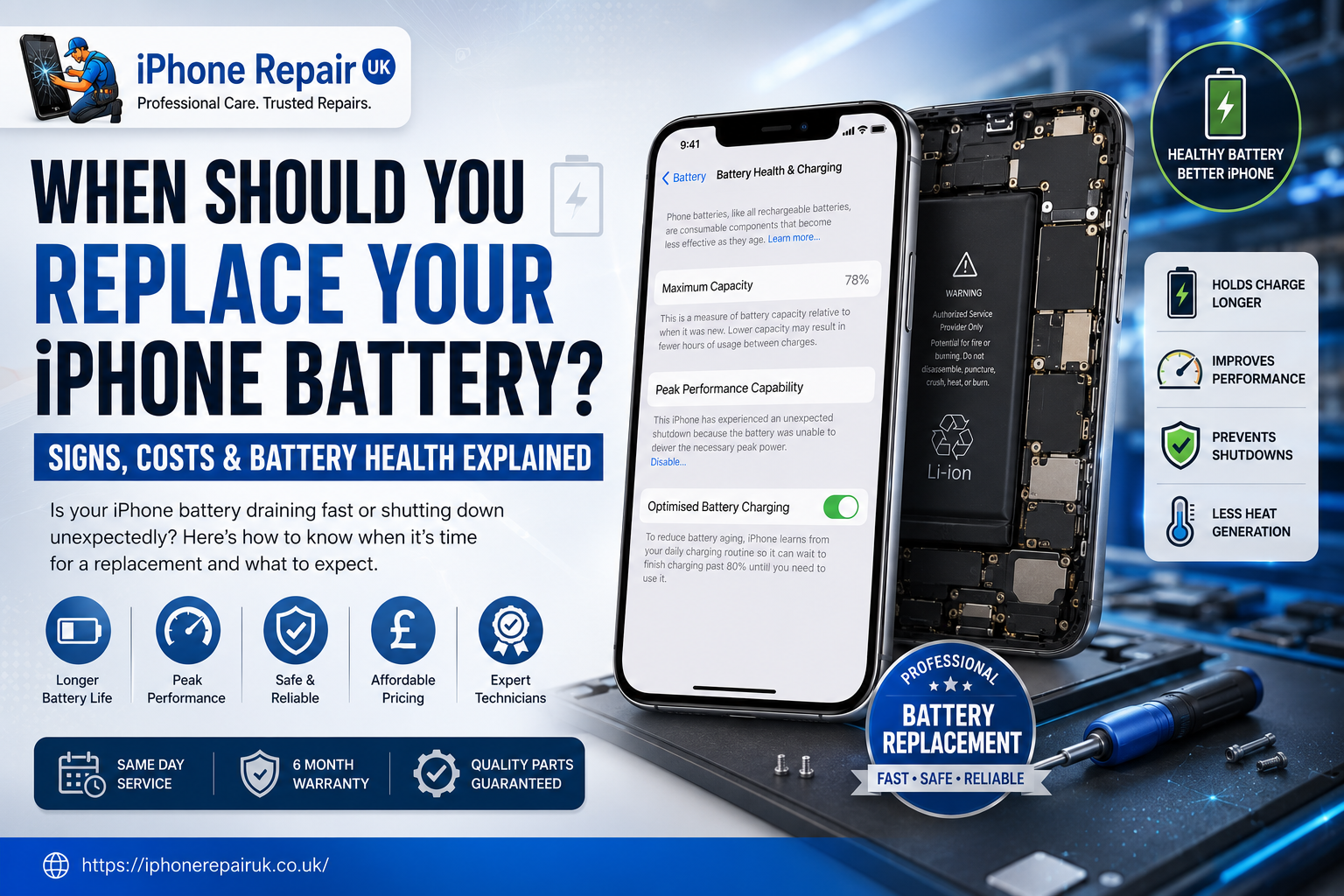
Under Settings, Battery, Battery Health and Charging, iOS may show a message that begins “This iPhone has experienced an unexpected shutdown because the battery was unable to deliver the necessary peak power.” Below that, performance management may already be enabled to prevent further shutdowns. That’s iOS telling you, quite clearly and in Apple’s own words, that the battery is no longer up to the job. If you turn performance management off, the shutdowns will come back. This is not something a software update will fix.
4. Physical Swelling of the Screen or Chassis
Look at your iPhone side-on, on a flat table. Is the screen sitting flush, or is there a visible gap between the display glass and the metal frame? Is the back glass bowed out in the middle? Can you feel a slight bulge under the screen when you press near the edges? A swollen battery is dangerous — it means the internal chemistry has failed and the cell is off-gassing. Stop charging it. Do not press on it. Do not attempt a DIY replacement. Ring us on 01633 549755 and bring it in the same day. We’ll deal with it safely. This one isn’t a book it in for next week job.
5. The Phone Gets Hot Doing Nothing
If your iPhone is warm to the touch while sitting idle, in a case, on a table, not charging — that’s the battery bleeding energy as heat. A healthy iPhone should feel neutral at rest. Persistent warmth is often the last stage of a battery that’s failing internally, and it usually comes with the fast-drain problem too.
Any one of these on its own can be a bad day; any two together is a clear replacement signal. If you’d like a fuller breakdown of what each sign points to at the internal-parts level, we’ve written a longer companion piece on the specific signs your iPhone battery needs replacing.
How to Check Your Battery Health (Step by Step)
You don’t need any apps or tools to see how your battery is doing. Apple built the check into iOS.
The Path
On any iPhone running iOS 11.3 or later — which is every iPhone from the 6 onwards — open Settings, Battery, Battery Health and Charging. Wait a moment for the readings to load.
What You’re Looking At
Two numbers matter. Maximum Capacity is a percentage — 100% is a brand-new battery, and anything below 80% is Apple’s own definition of significantly degraded. Peak Performance Capability is a status line. On a healthy phone it says “Your battery is currently supporting normal peak performance.” On a degraded phone it may say the phone has experienced unexpected shutdowns and performance management is enabled. That second reading is the more important one — a phone can sit at 82% capacity but still throw shutdowns, and that means the battery is done.
Reading the Numbers Honestly
90 to 100% means perfectly healthy — ignore it and come back in a year. 85 to 89% is normal wear and no action is needed. 80 to 84% means you should monitor the phone, and if you’re getting shutdowns you should replace the battery — if not, keep going. Below 80% means replace. That is Apple’s own recommendation and you’ll get noticeable performance improvements as well as battery life back. A Service message or unknown battery usually indicates a previous non-genuine battery has been fitted — come and see us and we’ll tell you what’s actually in there.
Cycle Count (If You Want to Check)
From iOS 17 onwards on iPhone 15 series, Apple also shows Cycle Count under the same menu. On older iPhones, cycle count sits under Settings, General, About, lower down the list. It’s less useful than Maximum Capacity for most people, but it’s a nice cross-reference.
What About DIY? A Straight Answer
Half the internet will show you an iPhone battery replacement in a 12-minute YouTube video and tell you it’ll cost you £15 and an afternoon. Some of that is technically true. Most of it is a mistake we spend a lot of our week undoing.
What DIY Skips
Pull-tab adhesive strips are the specific stretch-release adhesive strips that hold the battery in place. Removed wrong, they snap; then you’re prying a lithium cell out of an aluminium chassis with a plastic pick, which is exactly how DIY fires start. Screen and back-glass gasket seals mean every time you open an iPhone, you break the waterproof seal — refitting properly requires new adhesive and precise application, and skipping this means your next dropped-in-a-puddle moment ends the phone. Battery calibration matters because on iPhone XR and later, iOS pairs the battery to the phone electronically — a non-genuine battery will show a warning under Battery Health and Maximum Capacity readings won’t work. And swollen batteries are the most serious issue — puncturing a swollen lithium cell releases toxic gas at best and ignites at worst. This is a fire risk we take very seriously in our workshop and it is not a home job.
When DIY Makes Sense
Honestly, almost never for a phone you care about. If you have an old iPhone 6 or 6s you’re using as a spare or dev device, and you’re comfortable with electronics, and the battery isn’t swollen — sure. For an iPhone that holds your banking, your photos, your car keys and your work email, the price difference between a proper battery replacement and a bag of tools plus a weekend isn’t worth it.
What a Professional Battery Replacement Costs
We don’t quote a fixed price online because we quote after we’ve seen the phone — free diagnostic, fixed quote, no work until you agree. But here’s the shape of things.
The Honest Price Range
For an iPhone SE through to an iPhone 11, an iPhone battery replacement at our Newport shop typically sits at the lower end of the range. iPhone 12 through iPhone 14 sit in the middle. iPhone 15 series onwards, and the Pro models across the range, sit at the higher end — partly because the batteries are more expensive parts and partly because the disassembly is more delicate. Genuine Apple batteries cost more than high-quality aftermarket batteries, and we’ll tell you which we’re proposing and why.
What Drives the Number
Three things move the price. The model — newer is dearer. The part — genuine versus high-quality third-party. And whether there’s collateral work, for example a bent chassis that needs correcting or a stuck battery from a previous DIY attempt.
Same-Day, Most of the Time
Battery replacements are among the fastest jobs we do. For the vast majority of models, we can turn a battery around in under an hour if you walk in during a quiet window. The catch is stock — for the newest Pro-model batteries it’s worth ringing 01633 549755 or WhatsApp’ing 07424 623491 first. Our same-day repair walkthrough covers what a walk-in visit actually looks like from the counter side.
Pay When It’s Done
You don’t pay a deposit, and you don’t pay until the repair is finished and you’ve watched the phone boot and tested Battery Health with us. If we spot something else during the diagnostic that changes the quote, we ring you before we do the work. If we can’t fix it, you don’t pay.
The Warranty
Every battery we fit comes with a warranty on parts and workmanship. If it develops a fault that isn’t the result of physical damage — shutdowns, unusually fast degradation, charging problems — we’ll sort it. There’s more on our repair philosophy and pricing model in the Newport iPhone repair costs and turnaround guide.
After the Replacement: Getting the Most From Your New Battery
A new battery isn’t a fresh phone — the rest of the components have aged with it. But treated well, a fresh battery will give you two to three good years of use before you’re back here. Here’s what actually matters.
Optimized Battery Charging
Under Settings, Battery, Battery Health and Charging, leave Optimized Battery Charging switched on. It uses machine learning to stop the phone charging past 80% overnight, then finishes to 100% just before you usually wake up. This dramatically reduces time-at-full-charge, which is one of the biggest factors in long-term battery health.
Charge Limit (iPhone 15 and Later)
If you have an iPhone 15 or newer, you’ll see a Charge Limit option — 80%, 85%, 90%, 95% or 100%. If you’re not travelling and always near a charger, setting it to 80% or 85% will materially extend the battery’s useful life. You’ll lose a few hours of end-of-day capacity but gain a year or more of good health.
Heat Management
The single best thing you can do is avoid heat. Don’t leave the phone on a car dashboard in summer. Take heavy cases off during long gaming sessions. If you’re using MagSafe or Qi wireless charging, don’t leave the phone on the pad for hours on end — wireless is less efficient and generates more heat than a cable.
What to Expect Over Time
Your new battery will show 100% Maximum Capacity for the first few weeks. It’ll drop to 99% relatively quickly — that’s normal and not a defect. After that, expect a slow, gradual decline of about 5 to 7% per year with normal use. When it hits 80% in two or three years, you’ll know exactly what to do because you’ve done it before.
When Battery Isn’t the Whole Story
We should be honest: sometimes people come in convinced their battery is dying, and the fault is somewhere else. A dodgy charging port stops the phone getting a proper charge, which mimics fast drain. A rogue app running in the background can shred battery life on any phone, healthy or not. A bad iOS update, though rare, can cause temporary battery drain that resolves in a point release. Our free diagnostic catches all of that. If your battery is fine and something else is the problem, we tell you — and we’re happy to sort that instead, whether it’s a charging port, a screen or something more involved.
The Bottom Line
If Maximum Capacity is under 80%, or you’re getting shutdowns before 40%, or you’ve noticed any physical swelling around the screen or back glass, your iPhone battery has told you clearly it wants replacing. A professional replacement takes under an hour for most models, costs a fraction of a new phone, and gives you two or three more good years of the iPhone you already know. It’s one of the highest-value repairs we do, and one of the fastest.
If you’d like a fixed quote, please get in touch with your model and — if you can — a screenshot of your current Battery Health screen. Or walk into 39 Commercial Street between 9am and 6pm Monday to Saturday, or 11am to 4pm on Sunday. We’re a short walk from Newport train station and there’s usually a technician on the bench happy to check your phone while you wait.